


…Factor fell off, who was left?
Actually, the original joke involved Pete and Re-Pete. You can guess how the punchline went. Sometimes, re-factoring our code can feel like the same trap. But at some point, it also just feels necessary.
It’s been a while since my last post, partially because I really think I’ve reached one of those necessary refactoring points. I’ve been getting increasingly dissatisfied with my code. Between the increasing number of PowerUps and now new Enemy types, the code has become a veritable wasteland of switch and if-then-else statements. In other words, it’s gotten quite icky.
This close to the end of the project, I could have just let it go, but I didn’t. I decided instead to “skip ahead” and learn things not in the schedule yet. Initial list included inheritance, abstract classes, interfaces, polymorphism, object factories and probably other stuff. Sadly, at this point in my career all the above should be second nature to me. However, after a career that could be best described as a “professional walk-a-bout,” well, let’s just say it’s been a while and of course, I’ve never worked that deep with C# and Unity and the Unity part matters. Unity is an IDE and part of the power of an IDE is all the magic it does for you. So, it is very possible Unity will not deal well with something C# is capable of. You know, like displaying dictionaries in the Inspector, but we’ll get to that later.
Walking through the whole process would be painful and make you question my sanity. The overly simplified version is to take the current Enemy.cs class, subclass it, start moving code around and eliminate branching code by making each class do only what it needs to do; nothing else. We start by creating an empty subclass and then start moving code around. The methods being moved take several forms, but the underlying principle is identifying what is unique to the sub-class and what is common to all enemy types.
As I mentioned, methods being moved will take several forms. The easiest version will be a copy of the one from the parent class, minus all the branching. For instance, instead of checking if the enemy game object needs to move down, left or right, we just pluck the code we need for each one. Eventually, the original method in the parent class will be eliminated. This will look something like this.
This method in the parent class:
    protected void MoveMe()
    {
        switch (SpawnSide)
        {
            case "LEFT":
                transform.Translate(Vector3.right * Time.deltaTime * mySpeed);
                break;
            case "RIGHT":
                transform.Translate(Vector3.left * Time.deltaTime * mySpeed);
                break;
            case "TOP":
                transform.Translate(Vector3.down * Time.deltaTime * mySpeed);
                break;
            case "ANGLE":
                int newDirection = changeDirection ? 1 : -1;
                transform.Translate(new Vector3(1, -1 * newDirection, 0) * Time.deltaTime * mySpeed, Space.Self);
                break;
            default:
                transform.Translate(Vector3.down * Time.deltaTime * mySpeed);
                break;
        }
    }
Becomes this method in the child class (for the enemy type moving left to right):
    protected override void MoveMe()
       { transform.Translate(Vector3.right * Time.deltaTime * mySpeed); }
Nice, right…?
The second version will be only a partial replacement of the original. The parent version will need to be made a virtual method so the child one can override it and then invoke the parent method if needed. This will involve leaving the common code in the parent method (if we can) and abstracting out the distinctive code. Something like this:
Before:
    private void Start()
    {
        myPlayer         = GameObject.Find("Player").GetComponent<Player>();
        myExplosion_anim = GetComponent<Animator>();

        NullCheckOnStartup();
        StartCoroutine(FireLaser());
        StartCoroutine(ChangeDirection());
    }
After:
public abstract class Enemy : MonoBehaviour
    protected virtual void Start()
    {
        myPlayer         = GameObject.Find("Player").GetComponent<Player>();
        myExplosion_anim = GetComponent<Animator>();

        NullCheckOnStartup();
        StartCoroutine(FireLaser());
    }

public class EnemyHorizontalZigZag : Enemy
    protected override void Start()
    {
        base.Start();
        transform.position = SpawnPosition;
        transform.rotation = Quaternion.identity;
        StartCoroutine(ChangeDirection());
    }
The third type will be methods unique to the child class. This reduces needless clutter in the parent class. Instead of having RespawnRight(), ReSpawnLeft() and ReSpawnTop() methods in the parent class, we will end up with a single ReSpawn() method in each child class. Since we are isolating the code more, it also makes it easier to rename the methods if we want, say to something like Teleport(). Methods far enough down in the call stack, or completely unique to the child class will not be modeled in the parent class, so there will be no abstract or virtual method needing to be overridden.
The fourth type of refactoring includes replacing fields and abstracting out redundant code and replaceing them with properties. This makes it easier set and override values consistently. Some will become abstract properties in the parent class, others will be unique to child class.
For instance, constantly setting and using long calculations multiple times can be error prone. So, lines like this:
transform.position = new Vector3(Random.Range(-(screenBoundary_LR), screenBoundary_LR), (screenBoundary_TB + spawnPoint_T), 0); can have the calculation pulled out and turned into this:
transform.position = SpawnPosition;As you can see from the above, another thing going wrong with my code was growing the collection of badly named variables. Strictly speaking, this is not a code problem, it’s a data problem. Instead of a bunch of questionably named, disconnected fields, we could come up with something better contained. So instead of a variable containing the left/right screen boundary on the x-axis (screenBoundary_LR) and top/bottom screen boundary on the y-axis (screenBoundary_TB) , we can try creating something more explicit. My first attempt was an array, which was improvement but relating HorizontalSpawnBoundary[0] to the x-coordinate and HorizontalSpawnBoundary[1] to the y-coordinate still left room for improvement, especially if I need to (as I suspect I will) expand it to include all four boundaries independently.
My second thought was to use a dictionary which would allow for syntax like HorizontalSpawnBoundary["LEFT"]. I spent quite a bit of time thinking this was the path. Functionally, this should work. What it lacks is the ability to be exposed in the Inspector. Because I suspect I will need to monkey a lot with these values, this is a feature I really needed.
Ultimately, this led me to creating a struct. It took a bit more exploring and experimenting, but I finally ended up with the following in the parent class.
    [System.Serializable]
    protected struct Boundary
    {
        [SerializeField] private float _x, _y;
        public Boundary(float x, float y) { _x = x; _y = y; }
        public float X { get { return _x; } }
        public float Y { get { return _y; } }
    }
    [SerializeField] protected Boundary ScreenBoundary          = new Boundary( 9.5f, 6.0f);
    [SerializeField] protected Boundary HorizontalSpawnBoundary = new Boundary(11.5f, 5.0f);
    [SerializeField] protected Boundary VerticalSpawnBoundary   = new Boundary( 8.5f, 8.0f);
The struct includes several things necessary. [System.Serializable] and the [SerializeField] within the struct is needed to expose the values of the struct. The struct also includes two private variables with related getters. The private variables can only be set via the constructor public Boundary(float x, float y) { _x = x; _y = y; }. With all this, any new object created with this struct will be made available in the inspector so the numbers can be worked with as required.
Finally, with most everything rearranged and refactored, we can now make the parent class abstract and include template, abstract functions.
public abstract class Enemy : MonoBehaviour
{
    //
    // Contract
    //
    abstract protected float   MySpeed       { get; }
    abstract protected Vector3 SpawnPosition { get; }
    abstract protected void    MoveMe();
    abstract protected void    Update();
...
}
What we are left with in the end is four classes and a custom data type. Enemy.cs becomes our abstract parent class. We have three child classes, EnemyVertical.cs, EnemyHorizontal.cs and EnemyHorizontalZigZag.cs. Finally, our Boundary data type (struct) can be used withing the Enemy class hierarchy. Each of the enemy child classes now works as a drop-in replacement for the original Enemy.cs class.
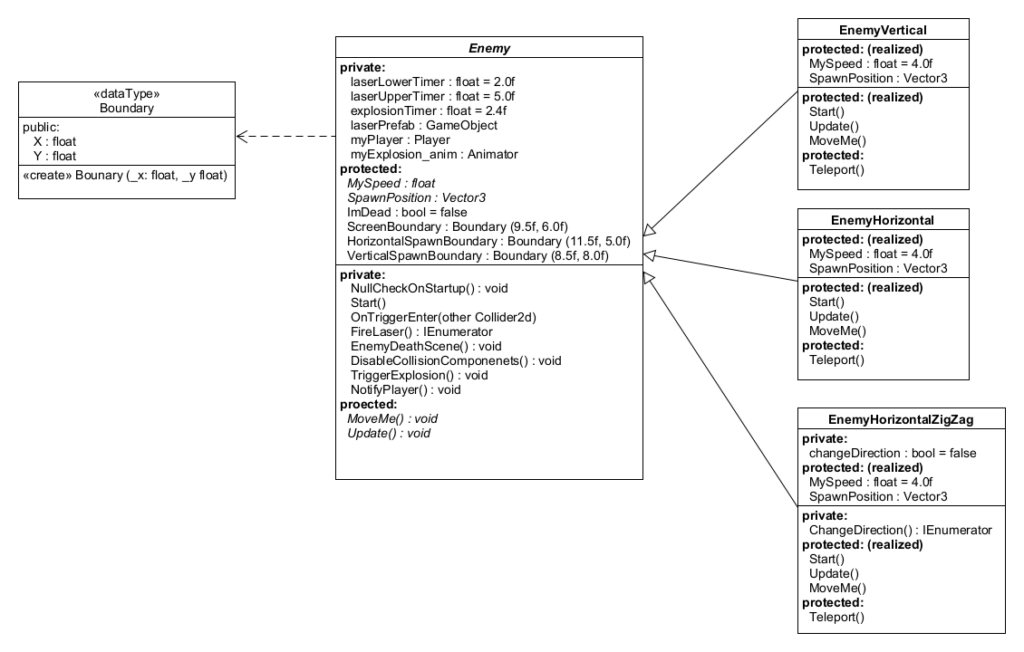
Of course, our work is hardly over. First of all, both EnemyHorizontal.cs and EnemyHorizontalZigZag.cs will end up coming in a right entry and left entry version. It may seem excessive but making a left and right sub-class is almost certainly going to happen next. Also,EnemyHorizontalZigZag.cs and EnemyHorizontal.cs are almost identical, so further abstraction may be possible. The resulting classes may well be almost trivial, but they will help encapsulate the enemy behavior better. This will be needful when we refactor the SpawnManager.cs to change up which type of enemy it invokes. One example already of pulling this behavior into the Enemy class (and out of the SpawnManager.cs class) is choosing the spawn point. Initially, the starting position was chosen by the SpawnManager with code like this:
    private void SpawnEnemy()
    {
        GameObject newEnemy = Instantiate( enemyPrefab
                                         , new Vector3(Random.Range(-screenLimitLeftRight
                                                                   , screenLimitLeftRight)
                                                                   , screenLimitTopBottom, 0)
                                         , Quaternion.identity);
        if (newEnemy != null) { newEnemy.transform.parent = enemyContainer.transform; }
    }
Now, it works this way.
public class SpawnManager : MonoBehaviour
    private void SpawnEnemy()
    {
        GameObject newEnemy = Instantiate(enemyPrefab);
        if (newEnemy != null) { newEnemy.transform.parent = enemyContainer.transform; }
    }


public class EnemyHorizontal : Enemy
    protected override Vector3 SpawnPosition
    {
        get
        {
            return new Vector3( -(HorizontalSpawnBoundary.X)
                              ,   Random.Range( -(HorizontalSpawnBoundary.Y)
                                              ,  (HorizontalSpawnBoundary.Y)), 0);
        }
    }
    protected override void Start()
    {
        base.Start();
        transform.position = SpawnPosition;
        transform.rotation = Quaternion.identity;
    }
Now, the SpawnManager no longer needs to know what kind of enemy it is spawning because it no longer needs to choose the spawn point at all. The enemy object decides for itself. In order for the SpawnManager to successfully spawn any type of enemy, each of those enemy types needs to become increasingly self-managing. If we also introduce the concept of an interface, we may well be able to merge the spawn management of the enemy types with the powerups.
I still have work to do on my enemy classes. My Spawn Manager is hopelessly broken. My Game Dev HQ Mentor is probably questioning my dedication, or at least my choices. But I should now have a reasonable enough structure I can continue that refactoring while also working on the spawning factory.