


My refactoring continues. My Enemy.cs class hierarchy is not yet complete, but enough for me to dig into refactoring the SpawnManager.cs class. It is implemented like any other game object, but it is essentially a factory for spawning enemy and powerup game objects. It’s also every bit as icky as the Enemy.cs was. Mainly because much of it was a direct response to all the if-then-elseing going on in the Enemy.cs class. The SpawnManager.cs class also had its fair share of if-then-elseing and corresponding methods calls with ever inventive names like SpawnEnemyWave01(), SpawnEnemyWave02(), etc.
I knew I wanted to get away from this line of thinking. I’d also just attended a couple webinars put on by GameDevHQ that contained some discussion concerning Level Design and how part of the Game Programmer’s job was to create game objects the Level Designer could monkey with and there-by refine how the objects interacted and differentiated themselves from level to level. Given the success I had with the Boundary struct in the Enemy.cs class, I thought I would explore a more data driven approach to my game object.
Since I had been able to easily test my new enemy sub-classes by just dragging and dropping them into the prefab variable exposed in the Inspector, I started simple. I turned the variable into an array. So, I changed:
[SerializeField] private GameObject enemyPrefab;into:
[SerializeField] private GameObject[] enemyPrefab;I then just dragged all three of the enemy prefabs (EnemyVertical, EnemyHorizontal and EnemyHorizontalZigZag) into the array in the Inspector. In my code, I was then able to make iterative changes, using each one, and then looping through the array to make sure each one worked properly. Even selecting the next enemy type at random.
With this working, I then set about designing my new data structure. Knowing I was going to eventually include as many “spawnable” items as I could in this process, I named the struct Spawnable. Like my Boundary struct, I included local variables to store the data, a constructor and accessor methods. I knew I would need an attribute to store the prefab we would be using to spawn new game objects. I also suspected I would need the name of the of the particular prefab and that I would need some sort of type identifier such as “Enemy” or “PowerUp”, etc.
It was here I began to flounder a bit. I could access the struct easily enough and I could instantiate the selected enemy prefab easily enough. What I struggled with was how to select which prefab to instantiate. See, this was the crux of the level design and the central part of the factory concept all together. Which one did I choose, and how many should I choose?
Initially, I just declare three different data structures, one for each type of enemy I needed to instantiate. Now, for my power ups, I had done this:
    private int ChoosePowerUpIndex
        { get
            {
                int selectIndex = Random.Range(1,56);
            //Debug.Log("Select Index Range: " + selectIndex);
            //
            // Note: This is dependendent on the order these power ups are placed
            //       in the array in the inspector which is wonky.
            //
            if      (selectIndex > 0  && selectIndex < 10) { return 0; }  // Triple Shot   approx: 17%
            else if (selectIndex > 9  && selectIndex < 20) { return 1; }  // Speed         approx: 17%
            else if (selectIndex > 19 && selectIndex < 30) { return 2; }  // Shield        approx: 17%
            else if (selectIndex > 29 && selectIndex < 40) { return 3; }  // Ammo          approx: 17%
            else if (selectIndex > 39 && selectIndex < 50) { return 4; }  // Health        approx: 17%
            else if (selectIndex > 49 && selectIndex < 55) { return 6; }  // Negative Ammo approx: 09%
            else if (selectIndex > 54 && selectIndex < 57) { return 5; }  // Spiral        approx: 05%
            return 0;
            }
        }
Besides the fact I already whined about this in a previous post, having this buried in the code made it unsuitable for manipulation by the level designer. So, I needed something different. I needed to think this through logically. After some highly productive brainstorming,

I came up with this. First, I would replace each of my individual enemy data structs with an array of structs. I then added an integer attribute to my struct called “weight.” This value would serve a similar purpose to the high and low values of each range in the else if statements above. I could then use this to create an array of indexes based on the weight of each index (prefab in the array of structs). So, let’s say EnemyVertical as the first struct in our array (now called spawnableObjects[]) and had a weight of 4. EnemyHorizontal was the next in the array with a weight of 2 and EnemyHorizontalZigZag was third with a weight of 1. This would create an array of indexes like this: [0,0,0,0,1,1,2] (remember, array indexes start with 0). Now, being overly simplistic, randomly choosing a value from this array, 0 is twice as likely to get chosen as 1 and four times as likely to get chosen as 2. We now have a way to “balance” and randomize our enemy selection. This new SpawnWeight[] array can be created with the following:
    [SerializeField] private Spawnable[]   spawnableObjects;
    [SerializeField] private int[]         spawnWeight;

    private void SetSpawnWeight()
    {
        int i = 0;
        foreach (Spawnable spawnableObject in spawnableObjects)
        {
            spawnWeight = spawnWeight.Concat(Enumerable.Repeat<int>(i, spawnableObject.Weight).ToArray()).ToArray();
            i++;
        }
    }
The syntax is a horribly cryptic, but it is the Enumerable.Repeat<>() function that allows us to easily add the correct number of indexes to our array without having to also have a nested loop. All the rest is just to incrementally add to the array. Note, there are other ways to do this, the nested loop being the most obvious. Since I’m not yet familiar with profiling and benchmarking in Unity, I had to rely on Google to guide me. While I did get conflicting reviews on which method was best, I opted to follow the one article that included benchmarking stats for doing something very similar. So, until I can prove it myself, I’m going with the one shown to be more performant in someone else’s testing.
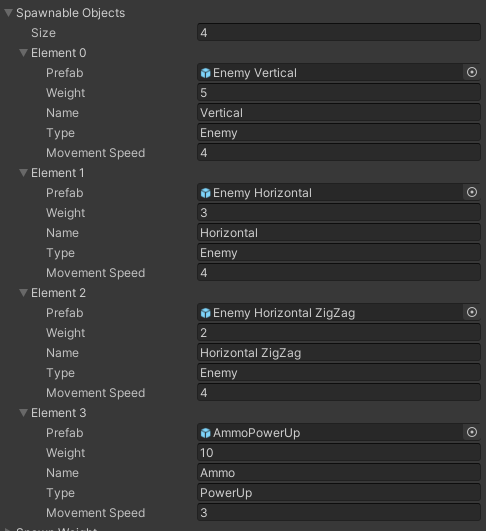
There is still a bit more to come, but this was one of the bigger breakthroughs since I started this particular refactoring. But right now, the following code,
    [SerializeField] private Spawnable[]   spawnableObjects;

    [System.Serializable]
    private struct Spawnable
    {
        public GameObject _prefab;
        public int        _weight;
        public string     _name, _type;
        public float      _movementSpeed;
        public Spawnable( GameObject prefab
                        , int        weight
                        , string     name
                        , string     type
                        , float      movementSpeed
                        )
        {
            _prefab        = prefab;
            _weight        = weight;
            _name          = name;
            _type          = type;
            _movementSpeed = movementSpeed;
        }
        public GameObject Prefab        { get { return _prefab;        } set { _prefab        = value; } }
        public string     Name          { get { return _name;          } set { _name          = value; } }
        public string     Type          { get { return _type;          } set { _type          = value; } }
        public float      MovementSpeed { get { return _movementSpeed; } set { _movementSpeed = value; } }
        public int        Weight        { get { return _weight;        } set { _weight        = value; } }
    }
Gets translated into the Inspector as this:
So, stay tuned, there’s more exciting adventures ahead…!