


So far, our game has been an endless stream of enemy fighters. Now it’s time to get more sophisticated. We are going to create a “wave system” for our enemy onslaught. This will make it much more like any classic arcade game and give our player a breather before the next attack.
In the simplest sense, this is nothing more than deciding how many enemies have been let loose and pause the game when that batch has been destroyed. Then, when the player says go, start the next wave.
I’ll be honest, the code got a bit messy. When I started this game, one of the first thoughts I had was “I’ll bet a state machine would be very handy for something like this.” Everything I have done so far has reinforced that. Even so, I don’t want to rewrite everything yet. But messy code is never fun. A visual aid would sure be handy. Maybe something like a Sequence Diagram would be handy.
In fact, besides redoing everything as a state machine, I’ve been thinking there is enough code now that some good, old-fashioned UML diagrams would be right handy. A bit ago, I even played around with the idea of documenting what I’ve done so far with a class diagram. Since I am still tinkering with the class diagram as a way to document what I’ve done, I was actually excited about the idea of trying out the sequence diagrams also. So, I spent some time walking the code. While at times it felt like I was lost in some wasteland of someone else’s making, I eventually came up with the following.
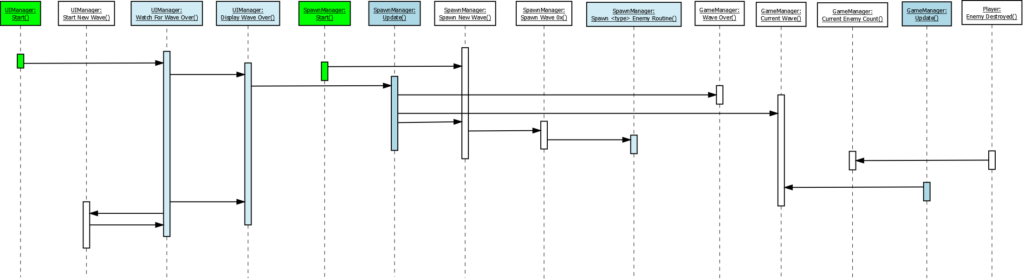
This of course, is where I would normally start walking you through it. However, as I started walking through it myself, getting ready to explain it, I realized it was not quite right. I started trying to correct it then realized that’s not actually a proper sequence diagram. It occurred to me even, one of the reasons I was having trouble following the diagram was in fact because it was done wrong.
Of course, just redrawing the diagram would be WAY to easy. I’ve been on a quest for some time for a good diagraming tool. There are things I want from this tool. First, I positively do not want an online tool. I’m sure there are some great ones out there. My disklike of online tools is irrational. Therefore, logical arguments have no hope of swaying me. So, it must be a desktop application. My primary design needs are UML and database. Other uses are a bonus, not a need. Tools I’ve used in the past are Oracle CASE/Designer, Visio, ERwin, Argo UML and Enterprise Architect. Enterprise Architect is probably my favorite, but out of my price range. I really liked Argo UML but that is a dead project.
The above diagram was made with Dia. Dia is a long time, well known, open-source drawing program and I have tried it multiple times in the past. I also strongly suspect if I spent a good long time with it, I could in fact make it into a powerful tool. I just keep not having the time to do so. It’s support of UML and database diagrams is too basic. The above diagram was way harder to make than I would like.
So, I poked around again to see if anything new had made an appearance on the scene. I stumbled on two; yEd and UML Designer. UML Designer is built on the Eclipse platform and to be honest, I have a lot of hope for this one. For now, however, there is too much of a learning curve on it. The problem with a “real” UML tool is you have to create the artifacts properly, not just draw boxes on the screen.
yEd seems to be a rather nice tool as well. It is a diagraming, not design tool, so easier to jump into. yEd does have built in support for class diagrams but not sequence diagrams. It does seem to be easier to work with than Dia, but it’s lack of ready-to-go support meant it basically suffers from the same problem as Dia, at least for my purposes.
Initially, I tried to make a go with UML Designer. But as predicted, the need to do things “right” was getting in the way of making the diagrams do what I wanted. I was about to jump back to Dia when I stumbled onto someone else’s sample sequence diagram done in yEd. While the example looked very clean and nice, I still did not want to take the time to figure out how it was done. But, having everything I needed in a sample diagram did make it easy enough to copy-n-paste from the sample into my diagram. The following diagram was created in yEd.
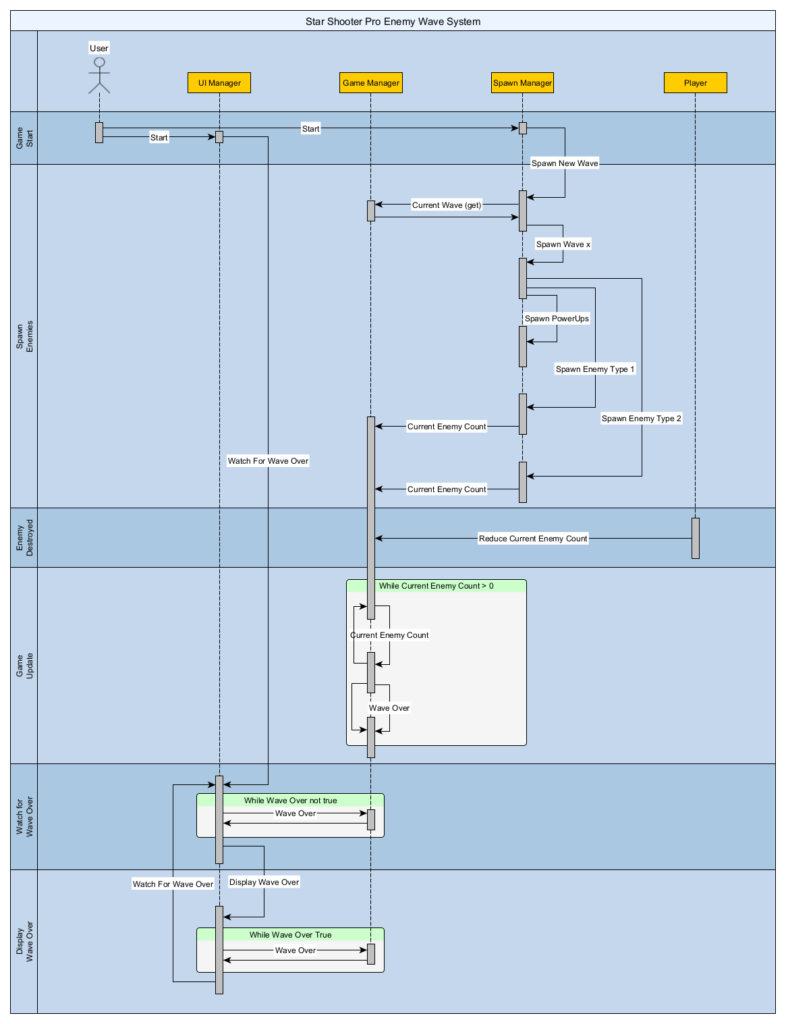
This of course, isn’t the entire game, just the enemy wave system.
Going through this process, did two things for me. One, I stumbled upon several bugs that were not obvious from the game play. It wasn’t until I essentially did a code review by walking the code they became obvious. Hopefully, I fixed them. Hopefully, I also have a nice document. But I can’t be sure of that, so I’m going to sit on it for a few days, come back to it, and see if it still makes sense. I still think a state machine will be a better code solution, but I also still think I need a good documentation and diagraming tool. So, I’m going to keep working it.
Finally, I took some time to look around a little harder and stumbled onto a few others to look into. One was a product I had actually used before and forgotten about. UMLet is the one I’ve worked with before. The other two are Papyrus and Modelio. So, I will have to take some time and see if I can’t finally choose a diagramming/design solution.
Until then, just smile and wave…